

At year-end 2025, IoT Analytics counted 21.1 billion connected IoT devices globally. Forty-five percent were enterprise connections. That number keeps growing. But when I walk a plant floor or a freight terminal, the number that actually matters is different: how many of those industrial IoT remote sensors changed a decision?
The technology is mature. The failure mode in 2026 isn’t the hardware dying on a shelf. It’s deploying 200 sensors, drowning in 300 daily alerts, and still missing the compressor failure that shuts down a production shift.
This guide covers what remote sensors do, which types solve which problems, how connectivity works in real industrial environments, and the deployment mistakes I keep seeing across MRO bays, logistics operations, and manufacturing lines. If you’re evaluating condition monitoring, asset tracking, or environmental compliance, this is the field perspective the datasheets leave out.
What Industrial IoT Remote Sensors Actually Do
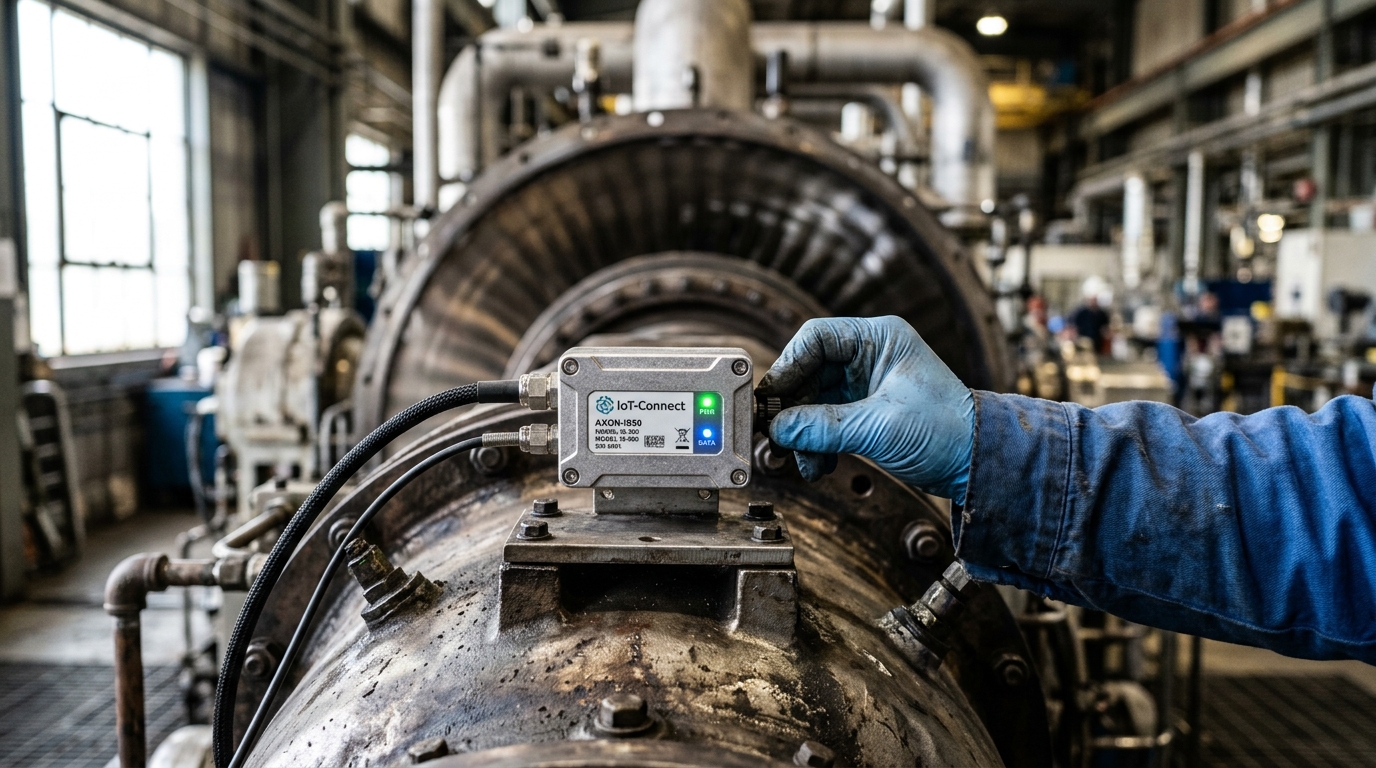
An industrial IoT remote sensor measures a physical condition (vibration, temperature, humidity, pressure, acoustic signature, fluid level, tilt) and transmits that measurement to a location where someone or something can act on it. “Remote” means the person consuming the data doesn’t need to stand next to the asset.
The “industrial” qualifier is where most confusion starts. Consumer IoT sensors operate in climate-controlled rooms, tolerate occasional dropouts, and serve convenience. Industrial sensors face metal dust, continuous vibration, temperatures from -40°C to +85°C, electromagnetic interference, and sometimes explosive atmospheres. They must deliver reliable data on a deadline, not just eventually. Understanding industrial IoT device requirements helps separate genuine industrial-grade hardware from repackaged consumer equipment.
NIST’s Guide to Industrial Wireless Systems Deployments defines reliability as delivery within the required time. Not eventual packet arrival. That single distinction separates a functioning monitoring system from an expensive data-logging experiment.
Think of the architecture as a chain:
Sensing element → Local processing → Communication link → Gateway → Application → Response
Each link fails independently. A sensor with perfect accuracy, connected to a gateway that drops packets at peak load, produces the same operational outcome as having no sensor at all. This is why evaluating sensors in isolation misses the point. The system either changes a decision or it doesn’t.
Sensor Types and Where Each One Fits
The taxonomy matters less than the match between sensor and operational question. Here’s what I see deployed most often, mapped to the problem each one solves.
| Sensor Type | What It Measures | Operational Question | Example |
|---|---|---|---|
| Vibration + temperature | Acceleration, frequency spectrum, surface temp | Is this motor or compressor developing a bearing fault? | Advantech WISE-2410: computes 8 vibration characteristics onboard, LoRaWAN, IP66 |
| Acoustic + temperature | Ultrasonic emission, pipe surface temperature | Is this steam trap leaking or blocked? | Emerson Rosemount 708: non-intrusive clamp-on monitoring |
| Level + GPS | Fluid level, location, temperature | When does a remote tank need replenishment? | Emerson Rosemount 408: radar + LTE-M/NB-IoT + cloud assignment |
| Environmental | Air temperature, relative humidity | Are storage conditions within spec? | Cold chain, pharma, aviation parts warehousing |
| Tilt / inclination | Angle change, pitch, roll | Has equipment or a structure shifted? | Monnit ALTA: structural and equipment orientation monitoring |
| Pressure | Line or vessel pressure | Is pressure drifting outside process limits? | Hydraulic, pneumatic, and process applications |
One pattern keeps showing up: the sensors that deliver the fastest ROI aren’t the most sophisticated. In a documented case, Denka Chemicals Singapore deployed wireless acoustic monitors on steam traps and found 24 failed units. Steam demand dropped 7%. No machine learning. Just a sensor clamped to a pipe, telling a technician exactly where to look.
Connectivity: Pick for the Job, Not the Brochure
Every sensor vendor leads with range. “Two miles standard. Twenty-eight miles with a high-gain antenna.” Those numbers come from open-field testing. Your facility has steel beams, concrete walls, motor-driven EMI, and competing RF sources. Plan accordingly.
HMS Networks’ 2026 industrial network study puts Industrial Ethernet at 79% of newly installed factory-network nodes. Wireless sits at 7%. Not because wireless failed. Because wired networks own the control backbone. Wireless fills a different role: retrofitting measurement points where pulling cable costs more than the sensor, reaching mobile assets, and extending visibility to places that were never wired.
| Protocol | Best Fit | Key Constraint |
|---|---|---|
| WirelessHART / ISA100.11a | Plant-scale process instrumentation | Mesh paths add latency variability; validate timing requirements |
| Bluetooth Low Energy | Motor-mounted sensors with nearby gateway or phone | Short range; requires local collection infrastructure |
| LoRaWAN | Low-power periodic telemetry (temp, level, tilt) | Class A receives downlinks only after uplink; limited for real-time commands |
| LTE-M / NB-IoT | Distributed assets on cellular coverage | Carrier availability varies; recurring connectivity cost |
| 5G RedCap | Mid-tier gateways, cameras, industrial routers | Reduced 5G complexity, not the lowest-power IoT tier |
| Satellite NTN + cellular | Assets beyond terrestrial coverage | Coverage not uniform worldwide; verify by location |
A development worth watching: in September 2026, Particle’s M635e module received certification for satellite IoT connectivity, combining LTE-M, Wi-Fi, BLE, and satellite NTN in a single device. For distributed assets like remote tanks or transport containers, the design question shifts from “Is there cellular coverage?” to “Which messages take which available path?” Satellite coverage is not uniform worldwide and varies by country and location. Test before you commit fleet-wide.
One underrated design choice: local processing at the sensor. Analog Devices documents a vibration architecture where a 512-point FFT runs on the sensor itself. You transmit a condition indicator, not a raw waveform. Lower bandwidth demand, lower power consumption, lower cloud cost. The edge-vs-cloud decision should be made per measurement type, not as a blanket architecture policy.
What Goes Wrong in the First 90 Days
Existing guides on this topic cover types and protocol specs thoroughly. Almost none cover what happens after you unbox the hardware. Here’s what I see go wrong, on repeat.
Dead zones in metal environments
Steel structures, dense racking, and underground vaults absorb and reflect RF signals in ways that no vendor datasheet predicts. A sensor that works perfectly on a test bench loses connectivity 40 meters away behind a steel bulkhead. NIST’s industrial wireless guidelines recommend a site survey before selecting hardware. Skip this step, and your first month becomes an expensive antenna-placement experiment.
Interoperability between vendors
You have vibration sensors from one vendor on your compressors. Now you’re adding environmental monitors from another vendor in your storage areas. Both use MQTT. Problem solved?
Not quite. MQTT moves messages. It doesn’t ensure different vendors’ applications understand each other’s data format, device state, or naming conventions. The Eclipse Sparkplug specification adds discovery, state awareness, and birth/death certificates on top of MQTT to close this gap. If your gateway speaks Sparkplug and your sensor vendor doesn’t, you’re building custom middleware. Budget the engineering time before you budget the hardware.
Alert fatigue kills ROI silently
Deploy 50 vibration sensors with ISO 10816 default thresholds, and within a week your maintenance team gets 300 alerts daily. Most are false positives from normal operating transients. By week three, technicians stop reading alerts. By month two, a real bearing fault gets buried in the noise.
The fix: asset-specific baselines. Analog Devices emphasizes that measurement location, mounting method, and operating conditions all affect vibration signatures. Change the probe angle, and you change what “normal” looks like. Establish baselines per asset before setting alarm thresholds. Unglamorous work. Also the difference between a monitoring system that gets used and one that gets muted.
The response gap
The sensor detects. The alert fires. Nobody has a defined response workflow. No assigned technician, no maintenance window, no spare part in inventory. The alert sits in a queue until the asset fails anyway.
Detection without response is monitoring theater. Before you scale sensors, answer three questions: Who responds? Within what timeframe? With what resources?
Three Deployments With Real Numbers
These cases are selected because the mechanism is documented well enough that you can judge whether the same logic applies to your operation.
South Bend, Indiana: $500M in avoided infrastructure
EPA documents South Bend’s smart-sewer program: 120 sensors and actuators trading available sewer capacity in real time across the network. Instead of treating every capacity shortfall as a construction project, the system optimizes existing infrastructure dynamically.
Reported outcomes: more than 70% lower combined-sewer-overflow volume (roughly 1 billion gallons annually), $1.5 million in annual O&M savings, and $500 million in avoided capital improvements. Those numbers reflect the complete intervention (sensing plus analytics plus actuation), not sensor hardware alone.
Smaller scale, same logic: Hawthorne, California, instrumented about 50 manholes (roughly 2.5% of its sewer network) and saved an estimated $2 million in overflow-related fines. You don’t need universal instrumentation. You need visibility where uncertainty drives costly decisions.
Denka Chemicals: acoustic monitoring cuts steam waste
Wireless acoustic sensors clamped onto pipes identified 24 failed steam traps. Steam demand dropped 7%. The company expanded to monitoring nearly 150 traps. No advanced analytics. Just sensors telling maintenance where to look, paired with technicians who actually went and fixed the traps.
PepsiCo: competitive testing before commitment
PepsiCo Labs ran a side-by-side evaluation of multiple machine-health solutions before selecting one for its unplanned-downtime target. The published case reports fewer unexpected breakdowns and lower incremental parts costs, but doesn’t disclose a specific downtime-reduction figure.
The lesson isn’t a transferable savings percentage. It’s the process. PepsiCo tested solutions against each other on the same production assets before committing. If a vendor resists head-to-head piloting, that tells you something about their confidence in real-world performance.
Two Risks the Sales Pitch Skips
Vendor lock-in is a lifecycle problem
In October 2024, AWS stopped accepting new customers for Amazon Monitron. Device sales continued until July 2025. Existing customers retained service access, and AWS committed to honoring the five-year device warranty with support. No new features were planned.
Monitron wasn’t a technical failure. It was a commercial-direction change on a hardware-plus-cloud product while deployed equipment was still in the field. The lesson applies broadly: any connected sensor platform can shift direction mid-deployment. Before you commit, get contractual clarity on data export, service continuity, local-operation fallback, and migration support. The cheapest sensor that locks your data into a platform you can’t leave isn’t cheap.
Security exposure grows with every connected device
In late 2023, CISA reported exploitation of Unitronics PLCs in water utility systems. The affected authority took its system offline and switched to manual operations. No drinking water was compromised, but operations were disrupted. The likely entry point: poor password hygiene and direct internet exposure.
The compromised device was a PLC/HMI, not a wireless sensor. But the principle extends: expanding remote visibility must not accidentally expose the control layer. CISA’s July 2026 advisory repeats the same guidance: remove PLCs from direct internet access and use a gateway or VPN for remote operations.
NIST SP 800-82 Rev. 3 provides the OT security framework that accounts for physical-system performance, reliability, and safety alongside cybersecurity. Monitoring an asset and closing a safety-critical control loop carry different risk profiles. Treat them differently.
How to Choose Without Overengineering
After years of deploying sensing and tracking solutions across industrial environments, here’s the decision sequence that works:
- Start with the failure mode, not the sensor catalog. Identify the most expensive unplanned event or operational blind spot. What does it cost per occurrence? How often does it happen?
- Define the response before the detection. Who acts on the alert? Within what window? With what parts, tools, or authority? If these answers don’t exist, sensors won’t help.
- Survey the physical environment. RF propagation in your actual facility, not a vendor’s test lab. Metal structures, interference sources, gateway placement. NIST recommends this step before hardware selection. Follow NIST.
- Pilot on 5 to 10 assets. Prove measurement quality, communication reliability, and the response workflow. Measure actual operational improvement before committing to a fleet rollout.
- Negotiate the exit plan. Data export rights, support commitments, local-operation fallback. The Monitron case is cheaper to learn secondhand.
- Scale to where the same problem repeats. Not every asset needs a sensor. Hawthorne instrumented 2.5% of its network and saved $2 million.
The payback math is straightforward:
Annual net benefit = avoided downtime + reduced inspection labor + prevented losses − recurring costs (connectivity, subscriptions, battery replacement, training)
Simple payback = total installed cost ÷ annual net benefit
If the math doesn’t close on paper, adding more sensors won’t fix it.
At Datanet IoT Solutions, we help industrial teams match sensors, connectivity, and integration to specific operational problems, from asset tracking hardware for ground support and logistics to environmental monitoring devices for cargo and storage compliance. For deeper insights on selecting the right sensor technology for mobile assets, see our guide on IoT tracking sensors. If your current sensor deployment produces data without decisions, that’s a conversation worth having.

Frequently Asked Questions
What makes an industrial IoT sensor different from a consumer one?
Industrial sensors are built for hostile conditions: wide temperature ranges (-40°C to +85°C), ingress protection against dust and water, resistance to vibration and EMI, and reliable data delivery within a required timeframe. Consumer sensors prioritize convenience and cost in controlled environments. The engineering, certification, and price reflect that gap.
Which wireless protocol is best for industrial remote sensing?
No universal winner. LoRaWAN suits low-power periodic telemetry. BLE works for short-range sensor-to-gateway collection. LTE-M/NB-IoT covers geographically distributed assets. WirelessHART fits plant-scale process instrumentation. Start with your payload size, reporting interval, latency requirement, and power budget, then match the protocol.
How long do industrial IoT sensor batteries last?
Vendors commonly cite 5 to 10 years, but actual life depends on reporting interval, transmission power, temperature, and protocol overhead. Some models use non-replaceable batteries. Always validate expectations under your specific operating conditions and reporting schedule, not the vendor’s best-case lab scenario.
Can remote sensors replace manual inspection rounds?
They reduce frequency and improve targeting, but they rarely eliminate inspections entirely. A vibration sensor won’t catch a corroded bracket or a loose electrical connection. The best deployments use sensor data to send technicians to the right asset at the right time, not to keep them at their desks permanently.
What is edge processing, and does every sensor need it?
Edge processing means running computation on or near the sensor (like onboard FFT for vibration data) instead of transmitting raw signals to the cloud. It reduces bandwidth, power draw, and cloud cost. Not every sensor benefits. Temperature readings sent once per hour don’t need local computation. Vibration signatures sampled hundreds of times per second do.
How do I calculate ROI for a sensor deployment?
Total the avoided costs (downtime, fines, capital projects, inspection labor) and subtract recurring expenses (connectivity, subscriptions, battery servicing, training). Divide total installed cost by annual net benefit to get simple payback. Include integration and commissioning. If you can’t name a specific avoided cost, the ROI case isn’t ready yet.








 +1 508 292 2210

One Response